Automate Handoffs You Can Trust in Production
- Operations teams: route intake, approvals and handoffs between tools without writing scripts.
- Engineering teams: keep Synapse tasks in sync with GitHub and Jira through idempotent, retried actions.
- Product teams: turn meeting action items and doc changes into notifications and follow-up tasks.
- Platform engineers: inspect run logs, replay dead-lettered runs and review version history.
- Admins: pooled run allowances and an audit trail for every publish, edit and replay.
Anatomy of an Automation Run
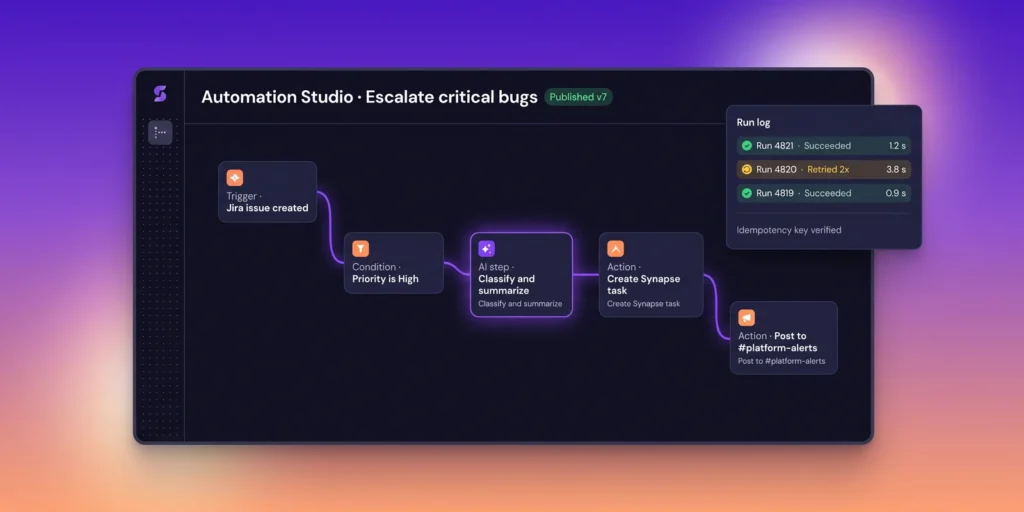
- Trigger: task, meeting or doc events, schedules, or inbound webhooks.
- Conditions: filter on fields, labels, projects, assignees or the output of an earlier step.
- Actions: Synapse API calls, integration actions such as Slack or Jira, and outbound HTTP requests.
- AI steps: classify, extract, summarize or draft, with outputs validated against your JSON schema and stored for replay.
- Recovery: up to 5 jittered retries, then the dead-letter queue; replay skips completed steps and resumes at the failure.
Key Capabilities
- Visual builder for triggers, conditions and actions, with drafts and published versions.
- AI steps with JSON-schema validated outputs; invalid output gets one repair attempt, then the run is dead-lettered.
- Step-level idempotency keys and deduplication at ingest, so retries never repeat a side effect.
- Exponential backoff retries with jitter (up to 5), a dead-letter queue and replay from the failed step.
- Per-run logs with step inputs, outputs and timings.
- Failure alerts on dead-lettered runs and abnormal retry rates, sent to owners by Slack, Microsoft Teams or email.
- Monthly run allowance pooled per workspace, with usage visible to admins.
- Inbound webhook triggers verified by HMAC-SHA256 signature before a run starts.
Integrations, API & Limits
| Item | Detail |
|---|
| Triggers | Task, meeting and doc events; schedules; inbound webhooks |
| Start a run | POST /v1/automations/{id}/runs (Idempotency-Key header) |
| Run status | GET /v1/automation-runs/{id} |
| Webhook | automation.run.failed (HMAC-SHA256 signed, automatic retries) |
| Retries | Up to 5, exponential backoff with jitter, Retry-After honored; then dead-letter queue |
| Runs / month (pooled) | Business 25,000 · Enterprise 100,000 |
| API rate limit | Business 1,000 · Enterprise 3,000 req/min (burst 2×) |
Security & Data Handling
- Scoped, short-lived tokens for every automation.
- Approval gates available on any write step.
- Integration secrets encrypted with AES-256 and redacted from run logs.
- Audit log entries for publishes, edits, replays and approvals.
- Encryption in transit (TLS 1.2+) for every API call and webhook.
- Outbound HTTP requests logged with destination and response status, with credentials redacted.
Availability & Pricing
| Plan | Included | Price (flat per workspace, EUR) | Runs / month |
|---|
| Starter | No | €10 / 1 month · €25 / 3 months · €45 / 6 months · €70 / 12 months (best value) | — |
| Team | No | €13 / 1 month · €35 / 3 months · €60 / 6 months · €100 / 12 months (best value) | — |
| Business | Yes | €15 / 1 month · €40 / 3 months · €70 / 6 months · €120 / 12 months (best value) | 25,000 |
| Enterprise | Yes | €20 / 1 month · €50 / 3 months · €85 / 6 months · €150 / 12 months (best value) | 100,000 |
Automate Handoffs With Retries and Run Logs